IOS16 Live Activities
SwiftPizza App for Apple ActivityKit & WidgetKit & Dynamic Island.

Apple Live Activities + Dynamic Island 🏝️ (Since iOS16)
SwiftPizza 🍕👨🏻🍳 App for Apple ActivityKit & WidgetKit
This is the first project example referring to the latest Apple ActivityKit beta and Dynamic Island (NEW) release.
Live Activities will help you follow an ongoing activity right from your Lock Screen, so you can track the progress of your food delivery or use the Now Playing controls without unlocking your device.
Your app’s Live Activities display on the Lock Screen and in Dynamic Island — a new design that introduces an intuitive, delightful way to experience iPhone 14 Pro and iPhone 14 Pro Max.
Preview 📱
Environment 🔨
- iOS 16.1 or above
- Xcode 14.1 or above
Tutorial 🤔
Dynamic Island: https://1998design.medium.com/how-to-create-dynamic-island-widgets-on-ios-16-1-or-above-dca0a7dd1483 Live Activities: https://1998design.medium.com/how-to-create-live-activities-widget-for-ios-16-2c07889f1235
Usage
Info.plist
Add NSSupportsLiveActivities key and set to YES.
Import
import ActivityKit
Activity Attributes (Targeted to both App and Widget)
struct PizzaDeliveryAttributes: ActivityAttributes {
    public typealias PizzaDeliveryStatus = ContentState

    public struct ContentState: Codable, Hashable {
        var driverName: String
        // Changed from Date to ClosedRange<Date> - 16.1
        var estimatedDeliveryTime: ClosedRange<Date>
    }

    var numberOfPizzas: Int
    var totalAmount: String
}
CRUD Functions (Start / Update / Stop / Show ALL)
func startDeliveryPizza() {
    let pizzaDeliveryAttributes = PizzaDeliveryAttributes(numberOfPizzas: 1, totalAmount:"$99")
    // Date() changed to Date()...Date() - 16.1
    let initialContentState = PizzaDeliveryAttributes.PizzaDeliveryStatus(driverName: "Tim", estimatedDeliveryTime: Date()...Date().addingTimeInterval(15 * 60))

    do {
        let deliveryActivity = try Activity<PizzaDeliveryAttributes>.request(
            attributes: pizzaDeliveryAttributes,
            contentState: initialContentState,
            pushType: nil)
        print("Requested a pizza delivery Live Activity \(deliveryActivity.id)")
    } catch (let error) {
        print("Error requesting pizza delivery Live Activity \(error.localizedDescription)")
    }
}

func updateDeliveryPizza() {
    Task {
        // Date() changed to Date()...Date() - 16.1
        // Demo reassignment: swap Tim → John mid-flight. The widget reads the
        // avatar via `Image(context.state.driverName)`, so changing the name
        // automatically swaps the rendered image set.
        let updatedDeliveryStatus = PizzaDeliveryAttributes.PizzaDeliveryStatus(driverName: "John", estimatedDeliveryTime: Date()...Date().addingTimeInterval(60 * 60))

        for activity in Activity<PizzaDeliveryAttributes>.activities{
            await activity.update(using: updatedDeliveryStatus)
        }
    }
}

func stopDeliveryPizza() {
    Task {
        for activity in Activity<PizzaDeliveryAttributes>.activities{
            await activity.end(dismissalPolicy: .immediate)
        }
    }
}

func showAllDeliveries() {
    Task {
        for activity in Activity<PizzaDeliveryAttributes>.activities {
            print("Pizza delivery details: \(activity.id) -> \(activity.attributes)")
        }
    }
}
Widgets
import ActivityKit
import WidgetKit
import SwiftUI

@main
struct Widgets: WidgetBundle {
   var body: some Widget {
       PizzaDeliveryActivityWidget()
   }
}

struct PizzaDeliveryActivityWidget: Widget {
    var body: some WidgetConfiguration {
        // attributesType changed to for - 16.1
        ActivityConfiguration(for: PizzaDeliveryAttributes.self) { context in
            VStack(alignment: .leading) {
                HStack {
                    VStack(alignment: .leading) {
                        Text("\(context.state.driverName) is on the way!").font(.headline)
                        HStack {
                            VStack {
                                Divider().frame(height: 6).overlay(.blue).cornerRadius(5)
                            }
                            Image(systemName: "box.truck.badge.clock.fill").foregroundColor(.blue)
                            VStack {
                                RoundedRectangle(cornerRadius: 5)
                                    .stroke(.secondary, style: StrokeStyle(lineWidth: 1, dash: [5]))
                                    .frame(height: 6)
                            }
                            Text(timerInterval: context.state.estimatedDeliveryTime, countsDown: true)
                            VStack {
                                RoundedRectangle(cornerRadius: 5)
                                    .stroke(.secondary, style: StrokeStyle(lineWidth: 1, dash: [5]))
                                    .frame(height: 6)
                            }
                            Image(systemName: "house.fill").foregroundColor(.green)
                        }
                    }.padding(.trailing, 25)
                    Text("\(context.attributes.numberOfPizzas) 🍕").font(.title).bold()
                }.padding(5)
                Text("You've already paid: \(context.attributes.totalAmount) + $9.9 Delivery Fee 💸").font(.caption).foregroundColor(.secondary)
            }.padding(15)
        }
        // NEW 16.1
        dynamicIsland: { context in
            DynamicIsland {
                DynamicIslandExpandedRegion(.leading) {
                    Label("\(context.attributes.numberOfPizzas) Pizzas", systemImage: "bag")
                        .font(.title2)
                }
                DynamicIslandExpandedRegion(.trailing) {
                    Label {
                        Text(timerInterval: context.state.estimatedDeliveryTime, countsDown: true)
                            .multilineTextAlignment(.trailing)
                            .frame(width: 50)
                            .monospacedDigit()
                            .font(.caption2)
                    } icon: {
                        Image(systemName: "timer")
                    }
                    .font(.title2)
                }
                DynamicIslandExpandedRegion(.center) {
                    Text("\(context.state.driverName) is on his way!")
                        .lineLimit(1)
                        .font(.caption)
                }
                DynamicIslandExpandedRegion(.bottom) {
                    Button {
                        // Deep link into the app.
                    } label: {
                        Label("Contact driver", systemImage: "phone")
                    }
                }
            } compactLeading: {
                Label {
                    Text("\(context.attributes.numberOfPizzas) Pizzas")
                } icon: {
                    Image(systemName: "bag")
                }
                .font(.caption2)
            } compactTrailing: {
                Text(timerInterval: context.state.estimatedDeliveryTime, countsDown: true)
                    .multilineTextAlignment(.center)
                    .frame(width: 40)
                    .font(.caption2)
            } minimal: {
                VStack(alignment: .center) {
                    Image(systemName: "timer")
                    Text(timerInterval: context.state.estimatedDeliveryTime, countsDown: true)
                        .multilineTextAlignment(.center)
                        .monospacedDigit()
                        .font(.caption2)
                }
            }
            .keylineTint(.accentColor)
    }
}
Xcode Preview (iOS 16.2 or above)
@available(iOSApplicationExtension 16.2, *)
struct PizzaDeliveryActivityWidget_Previews: PreviewProvider {
    static let activityAttributes = PizzaDeliveryAttributes(numberOfPizzas: 2, totalAmount: "1000")
    static let activityState = PizzaDeliveryAttributes.ContentState(driverName: "Tim", estimatedDeliveryTime: Date()...Date().addingTimeInterval(15 * 60))

    static var previews: some View {
        activityAttributes
            .previewContext(activityState, viewKind: .content)
            .previewDisplayName("Notification")

        activityAttributes
            .previewContext(activityState, viewKind: .dynamicIsland(.compact))
            .previewDisplayName("Compact")

        activityAttributes
            .previewContext(activityState, viewKind: .dynamicIsland(.expanded))
            .previewDisplayName("Expanded")

        activityAttributes
            .previewContext(activityState, viewKind: .dynamicIsland(.minimal))
            .previewDisplayName("Minimal")
    }
}
Offline End-State & Midpoint Flips 🔋
Live Activity widgets on the Lock Screen are snapshot-rendered with a strict render budget. Two side effects matter here:
TimelineView(.explicit([...]))/.periodic(...)inside the content closure is unreliable — iOS throttles / drops scheduled snapshots once the phone is locked or the app is backgrounded.Text(timerInterval:)andProgressView(timerInterval:)with.linearare the only primitives iOS interpolates frame-to-frame; everything else is a static snapshot until the nextactivity.update()/ push.staleDatealone cannot flip the widget to its "done" layout at an exact time offline. Without a real push, the snapshot taken aroundstaleDatecan lag by multiple seconds.
To flip a Live Activity to its end state offline, at the exact time, with no APNs push, this project ships two app-side keep-alive strategies that keep the app runnable in the background long enough to fire activity.update(finalContent) precisely at endDate:
| Strategy | Mechanism | Natural fit |
|---|---|---|
LocationKeepAlive |
CLLocationManager.startMonitoringSignificantLocationChanges() |
Delivery / navigation apps |
AudioKeepAlive |
Silent PCM WAV looped on AVAudioSession(.playback, .mixWithOthers) |
Timer / meditation / workout apps |
Both run a DispatchSourceTimer to endDate, then call activity.update(finalContent). The UI toggle (Location [ ⇆ ] Sound) in ContentView picks which side-channel starts for each delivery.
Required capabilities (both added to Info.plist):
<key>UIBackgroundModes</key>
<array>
    <string>location</string>
    <string>audio</string>
</array>
<key>NSLocationAlwaysAndWhenInUseUsageDescription</key>
<string>Track your driver in the background so the Live Activity stays fresh.</string>
Midpoint re-render push
Because TimelineView is unreliable on the lock screen, any discrete in-progress state change (e.g. warehouse icon → ✓ when the fill sweeps past the midpoint marker) also needs a keep-alive-driven push. The same DispatchSourceTimer pattern fires a second time at startDate + duration/2. Two patterns fit naturally on this midpoint fire:
- Force a snapshot only. Re-push the activity's current state — the widget body re-evaluates
Date() >= midpointand flips the icon. Use this when nothing inContentStateactually needs to change. - Mutate state at the midpoint. Push a modified
ContentStatethat reflects an in-progress event (e.g. driver reassignment). The demo in this project takes this path: at midpoint it swapsdriverNamefrom"Tim"to"John", which simultaneously flips the warehouse → ✓ icon, swaps the avatar viaImage(context.state.driverName), and triggers the conditional "Apple reassigned …" caption — all from a single midpoint push.
LocationKeepAlive.shared.start(
    until: endDate,
    midpoint: Date().addingTimeInterval(duration / 2),
    midpointFire: pushSnapshot,   // flips warehouse → ✓
    fire: pushSnapshot            // flips bar → delivered layout
)
Progress Bar Design 🚚
The lock-screen notification bar renders a 3-stop delivery journey:
[📦 package]──[⏱ timer 🏢 warehouse]──[🏠 home]
- Track: full-width
Capsule()in gray. - Fill:
ProgressView(timerInterval:)with.linearstyle and aLinearGradient(colors: [.blue, .green])tint — the only way to get a frame-by-frame smooth fill inside a Live Activity.scaleEffect(x: 1, y: 7)fattens the ~4pt system bar to 28pt;clipShape(Capsule())keeps the leading edge vertical. - Icons: package (left), warehouse (center, dead-centered via a
HStack(spacing: 0)split into twomaxWidth: .infinityhalves with the warehouse icon as the seam), home (right). Timer text sits on the left of the warehouse inside the left half. - Midpoint flip: warehouse 🏢 → ✓ via the midpoint keep-alive push.
- End state: the same bar, fully filled
LinearGradient, with a single ✓ parked at the right — reached via the final keep-alive push atendDate. Bottom paid-footer text stays so the widget doesn't change height between in-progress / delivered.
Responses
Start Activity
Console: Requested a pizza delivery Live Activity DA288E1B-F6F5-4BF1-AA73-E43E0CC13150
Update Activity
Updating content state for activity DA288E1B-F6F5-4BF1-AA73-E43E0CC13150
Show ALL Activities
Console: Pizza delivery details: DA288E1B-F6F5-4BF1-AA73-E43E0CC13150 -> PizzaDeliveryAttributes(numberOfPizzas: 1, totalAmount: "$99")
Sharing Images Across App, Widget & Live Activity 🖼️
The main app and the widget extension are separate targets with separate bundles — in this project that's iOS16-Live-Activities and WidgetDemo (the WidgetDemoExtension). The Live Activity UI is not a third target: it's a Widget configured with ActivityConfiguration that lives inside the widget extension bundle, alongside any home-screen widgets. Two consequences:
- An asset added to one target is not automatically visible to the other.
- During widget / Live Activity snapshot rendering the extension cannot kick off a network fetch and wait for it — snapshots are synchronous and have a tight render budget. See Case 2 below for the correct pattern.
Pick the strategy that matches where your images come from.
Demo in this project
The driver avatar shown next to the delivery bar (John) is loaded with Image(context.state.driverName) in WidgetDemo.swift. The asset name is driven by the driverName value passed in ContentState, so changing the driver in the main app automatically swaps the avatar — provided a matching image set exists in the widget's bundle.
This project follows Case 1 → Option A below: the avatars (Tim, John) live in a shared catalog at Resources/Assets.xcassets with target membership ticked on both iOS16-Live-Activities and WidgetDemoExtension, so the same image set is reachable from the app, the widget, and the Live Activity. The avatars are tiny so the per-target duplication in Assets.car is acceptable here; for production assets where IPA size matters, Option C (embedded dynamic framework) is the most reliable single-copy approach.
Case 1 — Bundled images (shipped with the app)
Best for: a known, finite set of images (logos, badges, demo avatars, fixed driver roster).
Option A — Multi-target asset catalog (quickest)
- Add the image set to one
Assets.xcassets. - Select the image set → File Inspector → Target Membership → tick both the app target and the widget extension.
- Reference it as usual:
Image("John").
⚠️ Each ticked target gets its own copy of the image baked into its bundle, so app size grows roughly linearly with the number of targets sharing the asset.
Option B — Shared Swift Package
- Create a local Swift Package (e.g.
SharedAssets) with its ownAssets.xcassets. - Add the package as a dependency of every target that needs the image.
- Reference it with the package's bundle:
Image("John", bundle: .module)
⚠️ SPM was not designed as a size-optimisation tool. Apple's SPM resources docs state the public contract is "use
Bundle.module, do not assume the bundle's exact location." Whether the same 2 MB image set ships once or twice depends on linkage and Xcode's per-target integration:
Library type Likely outcome with App + Widget Extension .staticResource bundle copied into every consuming target → 2 × size (no better than Option A) .automatic(unspecified)Behaves like .staticfor most Xcode integrations → not reliable for dedup.dynamic(explicit)Resources can live inside one Frameworks/framework → 1 × size — but Xcode may still duplicate the package's resource bundle into the extension. Outcome is integration-dependent.Setting
.dynamicexplicitly:.library( name: "SharedAssets", type: .dynamic, // necessary, but not sufficient targets: ["SharedAssets"] ),Because the result is not guaranteed by SPM's contract, the only way to know is to archive and
unzipthe.ipato count how manyAssets.car/*.bundlecopies are present. If reliable single-copy is the goal, prefer Option C below.
Option C — Embedded Framework target (most reliable dedup)
- Xcode → File → New → Target → Framework, e.g.
SharedAssets.framework. - Drop the
Assets.xcassetsinto the framework target. - Embed & Sign once — only into the main app target. In Build Phases → Embed Frameworks, the framework should appear under the app target (not the extension). The widget extension still links the framework (Build Phases → Link Binary With Libraries) but does not embed it — embedding it twice produces two copies in the IPA, defeating the dedup.
- Verify the extension's runpath search paths include
@executable_path/../../Frameworks(Xcode usually sets this for embedded extensions, but confirm in Build Settings → Runpath Search Paths). This is what lets the extension'sdyldfind the framework that lives one level up inMyApp.app/Frameworks/. - Reference with the framework's bundle from any consumer:
Image("John", bundle: Bundle(for: SharedAssetsMarker.self)) // or expose a static helper inside the framework: // public enum SharedAssets { public static let bundle = Bundle(for: SharedAssetsMarker.self) } // Image("John", bundle: SharedAssets.bundle) - Result: a single
MyApp.app/Frameworks/SharedAssets.frameworkshared by every target that links it with the correct runpath. True 1× size — verify by archiving and countingAssets.carin the unzipped IPA.
Comparison
| Option A (Multi-target catalog) | Option B (Swift Package) | Option C (Embedded Framework) | |
|---|---|---|---|
| Setup | 30 seconds | A few minutes + Package.swift tweak |
A few minutes (Xcode UI only) |
| Storage for 2 MB image, 2 targets | 4 MB (guaranteed) | 4 MB with .static / .automatic; possibly 2 MB with .dynamic, but not guaranteed |
2 MB (most reliable single-copy) |
| Single source of truth | ✅ source folder, ❌ on-disk (always 2×) | ✅ source, ⚠️ on-disk dedup not guaranteed | ✅ both |
| Reference syntax | Image("John") |
Image("John", bundle: .module) |
Image("John", bundle: SharedAssets.bundle) |
| Launch-time cost | None | None (static) / small dyld (dynamic) | Small dyld |
| Verify on-disk outcome | Trivial — count Assets.car files (you're confirming the expected 2× duplication) |
Must archive + unzip .ipa to confirm whether dedup actually happened |
Should still archive + unzip .ipa to confirm exactly one Assets.car lives inside Frameworks/SharedAssets.framework/ (and none in the extension bundle) |
| Best for | Tiny shared assets, fastest setup | Multi-package projects, code sharing too | When minimising IPA size matters and dedup must be reliable |
Case 2 — Downloaded images (fetched at runtime)
Best for: user-generated content, unbounded sets (real driver photos, dynamic product imagery), anything that must change without an App Store release.
Widget extensions and Live Activities cannot perform network calls during snapshot rendering, and ActivityKit ContentState payloads are capped at roughly 4 KB — so you cannot ship the image bytes inside the state. The pattern is: the main app downloads, writes to a shared container, and the widget reads from disk.
1. Enable App Groups on both targets
Xcode → Signing & Capabilities → add App Groups to the main app and the widget extension, both using the same identifier (e.g. group.com.you.pizza).
2. Main app — download and persist
let groupID = "group.com.you.pizza"
let container = FileManager.default
    .containerURL(forSecurityApplicationGroupIdentifier: groupID)!

func cacheAvatar(for driverID: String, from url: URL) async throws {
    let (data, _) = try await URLSession.shared.data(from: url)
    let dest = container.appendingPathComponent("\(driverID).png")
    try data.write(to: dest, options: .atomic)
}
3. Activity state — pass an identifier, not the image bytes
struct DeliveryAttributes: ActivityAttributes {
    struct ContentState: Codable, Hashable {
        var driverID: String   // e.g. "john_123" — NOT the image data
        var estimatedDeliveryTime: ClosedRange<Date>
    }
}
4. Widget — load from the shared container
private func avatar(for driverID: String) -> Image {
    let url = FileManager.default
        .containerURL(forSecurityApplicationGroupIdentifier: "group.com.you.pizza")!
        .appendingPathComponent("\(driverID).png")
    if let ui = UIImage(contentsOfFile: url.path) {
        return Image(uiImage: ui)
    }
    return Image(systemName: "person.crop.circle")   // graceful fallback
}
Important caveats
- The widget cannot trigger the download itself. Make sure the main app prefetches the image before calling
activity.request(...)/activity.update(...), otherwise the first snapshot will render the fallback. AsyncImagedoes not work inside Live Activity / widget snapshots — there is no async render pass. Always pre-write to disk and read synchronously.- Keep cached images small (a few hundred KB max). Widget extensions have a tight memory budget — a giant image will cause the snapshot to be killed.
- If the user wipes the app data or the cache is evicted, fall back to a
systemNameplaceholder rather than crashing.
Quick chooser
| Image source | Pick |
|---|---|
| Static, known at build time | Case 1 — pick Option A for tiny / simple sharing; Option C when strict IPA size matters and dedup must be reliable |
| Server-driven, per-user, or updated post-release | Case 2 (App Group + shared container) |
| Mixed — a few branded fallbacks plus dynamic content | Combine both: bundle the fallbacks via Case 1, cache the dynamic ones via Case 2 |
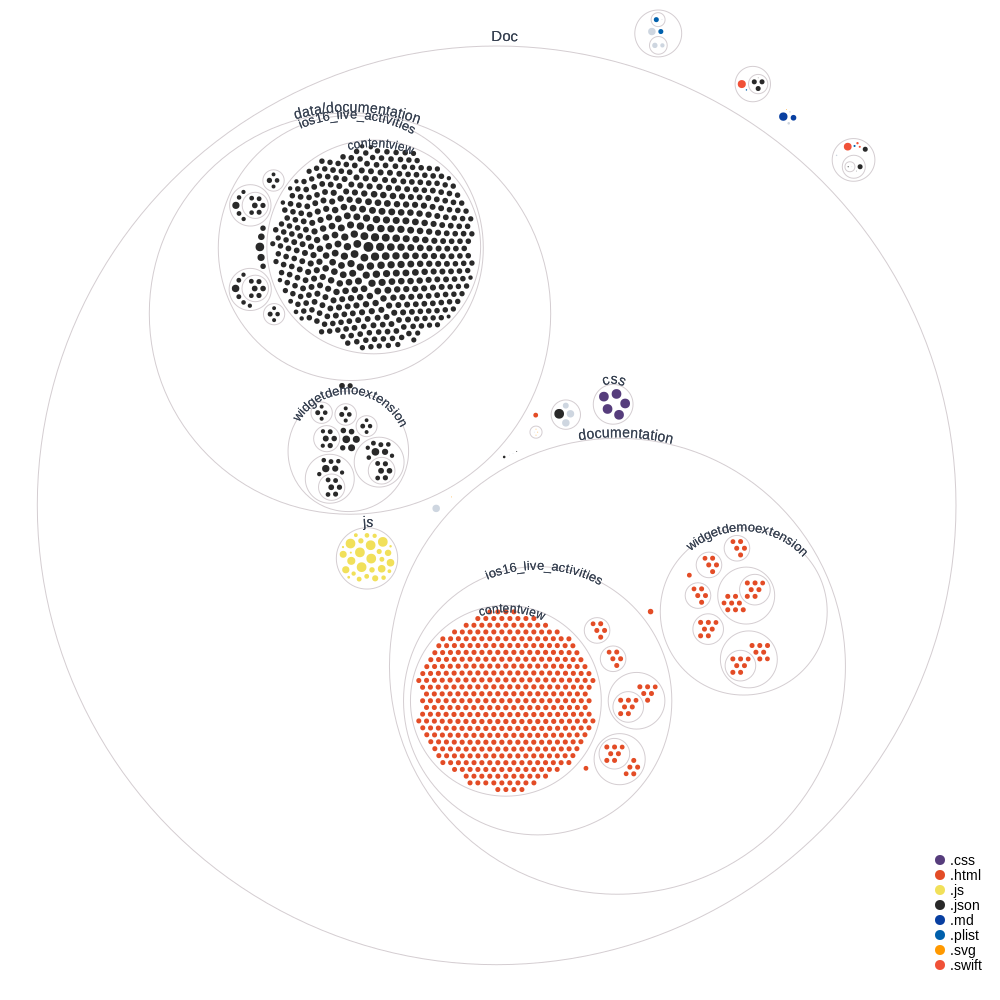
Structure
Resources 🐋
Legal 😄
Swift® and SwiftUI® are trademarks of Apple Inc.
Supported By
- 跨 117,000+ 个 skill 搜索
- 通过 CLI 安装:npx findskills
- Claude Code MCP 集成
- 为你的 agent 获取 API key