Aicode Toolkit
Toolkit for Coding Agents to work reliably with repo of any size.

AI Code Toolkit


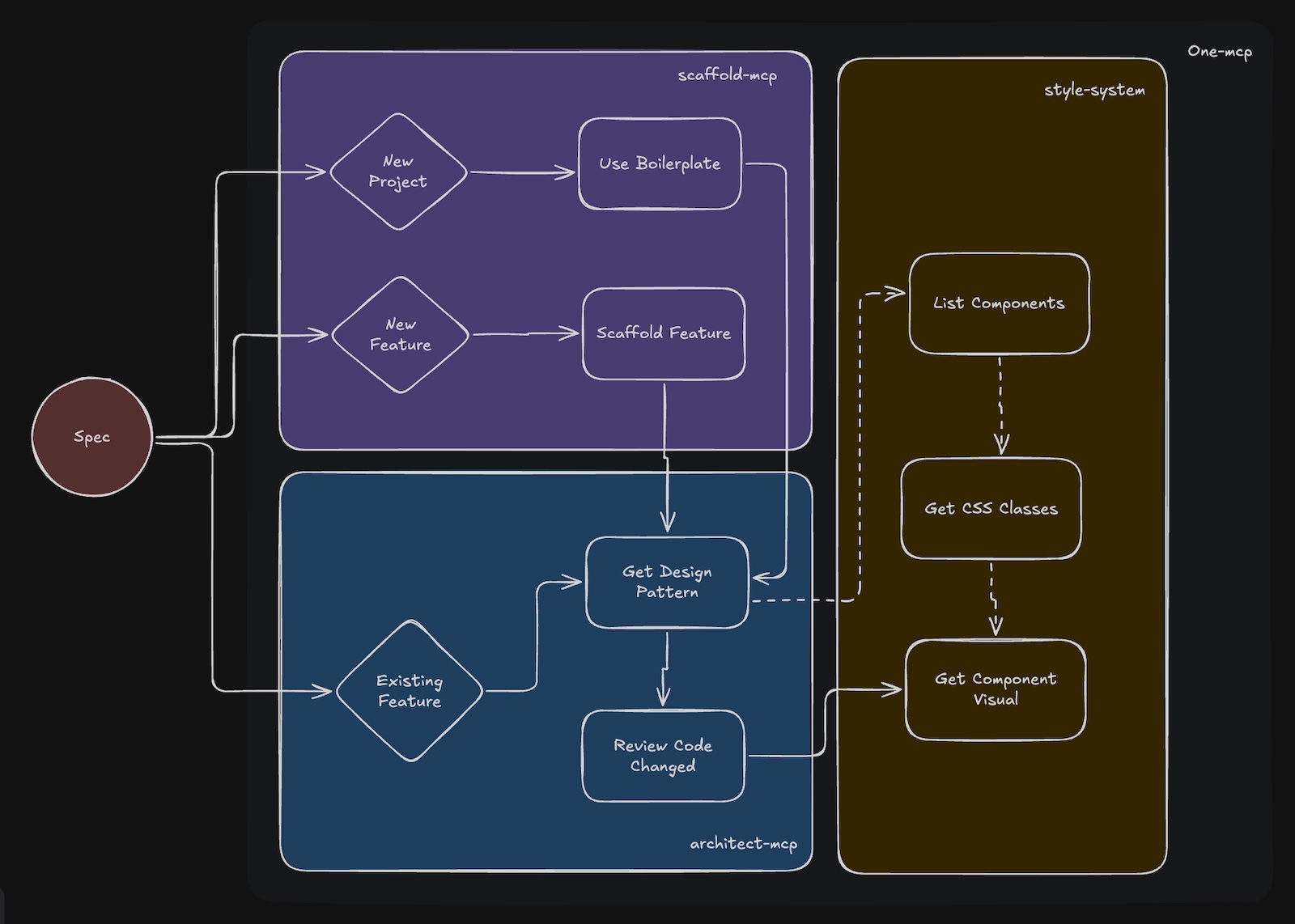
This repo provides:
- project and feature scaffolding via templates
- file-level design guidance before edits
- rule-based review after edits
- design-system discovery for frontend work
Why This Exists
As projects scale, conventions in docs like CLAUDE.md, AGENTS.md, and style guides become hard to keep concise and consistently applied by AI agents. This toolkit moves those conventions into reusable template configs (scaffold.yaml, architect.yaml, RULES.yaml) so agents can discover only the relevant guidance when needed.
Purpose-based plugins
For toolkit users who prefer an agent plugin, install only the workflows you need: aicode-bootstrap (project creation), aicode-develop (features and patterns), aicode-review (rules-based review), aicode-admin (authoring reusable configuration), or aicode-design (frontend discovery). Self-contained plugin roots are under plugins/ and work with the Claude Code/Cowork marketplace, Codex marketplace, and local Gemini extension installation; Cursor/Grok and Cowork's local stdio runtime still need client acceptance tests. Read the installation and compatibility guide before use. These bundles group workflows rather than restrict tool access.
Initialize the consumer project before starting a scaffold-backed plugin with interactive npx -y @agiflowai/aicode-toolkit@2.0.0 init --skip-mcp; plugin installation does not supply templates. Keep MCP server cwd in the consumer workspace. Published style-system 0.2.0 currently ignores some discovery filters until the dispatch fix is released. See compatibility.
Quick Start
Requirements:
- Node.js >= 22.12 (Node 24 recommended)
- an MCP-compatible agent such as Claude Code, Cursor, or Gemini CLI
1. Initialize a Workspace
# Existing project
npx @agiflowai/aicode-toolkit init

# New project
npx @agiflowai/aicode-toolkit init --name my-app --project-type monolith
This creates templates/ and .toolkit/settings.yaml. Projects reference templates through sourceTemplate in project.json or .toolkit/settings.yaml.
2. Configure MCP
init can configure MCP automatically. For manual setup, add the servers you need to your agent config.
Example for Claude Code:
{
  "mcpServers": {
    "scaffold-mcp": {
      "command": "npx",
      "args": ["-y", "@agiflowai/scaffold-mcp", "mcp-serve", "--admin-enable"]
    },
    "architect-mcp": {
      "command": "npx",
      "args": [
        "-y",
        "@agiflowai/architect-mcp",
        "mcp-serve",
        "--admin-enable",
        "--design-pattern-tool",
        "codex",
        "--review-tool",
        "gemini-cli"
      ]
    },
    "style-system": {
      "command": "npx",
      "args": ["-y", "@agiflowai/style-system", "mcp-serve"]
    }
  }
}
Useful flags:
--admin-enable: enable admin/template-authoring tools--design-pattern-tool <tool>: use an LLM to filter design patterns--review-tool <tool>: use an LLM for review output
3. Verify
Ask the agent:
What boilerplates are available?
It should call list-boilerplates. If not, restart the agent.
Repo Layout
AI agent
  ├─ scaffold-mcp
  ├─ architect-mcp
  ├─ style-system
  └─ one-mcp
        ↓
     templates/
       ├─ scaffold.yaml
       ├─ architect.yaml
       └─ RULES.yaml
scaffold-mcp
Generates projects and feature boilerplate from templates.
Core tools:
list-boilerplatesuse-boilerplatelist-scaffolding-methodsuse-scaffold-method
Admin tools:
generate-boilerplategenerate-feature-scaffoldgenerate-boilerplate-file
architect-mcp
Provides file-specific patterns before edits and reviews changes against RULES.yaml.
Core tools:
get-file-design-patternreview-code-change
Admin tools:
add-design-patternadd-rule
style-system
Provides theme, CSS class, and component discovery tools.
Core tools:
list_themesget_css_classesget_component_visuallist_shared_componentslist_app_components
one-mcp
Provides progressive tool discovery to reduce MCP prompt overhead.
Typical Workflow
Create a Project
User: "Create a Next.js app called dashboard"

Agent:
1. list-boilerplates
2. use-boilerplate
3. Project is generated
Add a Feature
User: "Add a products API route"

Agent:
1. list-scaffolding-methods
2. use-scaffold-method
3. Feature files are generated
Edit a File Safely
User: "Add a products page"

Agent:
1. get-file-design-pattern
2. edit the file using the returned patterns and rules
3. review-code-change
4. fix any violations
Style a Component
User: "Style the button with our theme colors"

Agent:
1. get_css_classes
2. list_shared_components
3. update the component
4. get_component_visual
Template Structure
templates/
└── nextjs-15/
    ├── scaffold.yaml
    ├── architect.yaml
    ├── RULES.yaml
    └── boilerplate/
scaffold.yaml
Defines boilerplates and feature scaffolds.
boilerplates:
  - name: nextjs-15-app
    description: 'Next.js 15 with App Router'
    targetFolder: apps
    includes:
      - boilerplate/**/*

features:
  - name: add-route
    description: 'Add route with page and layout'
    variables_schema:
      name: { type: string, required: true }
    includes:
      - features/route/**/*
architect.yaml
Defines file-level patterns that should be shown before edits.
patterns:
  - name: server-component
    description: 'Default for page components'
    file_patterns:
      - '**/app/**/page.tsx'
    description: |
      - Use async/await for data fetching
      - Keep components focused on rendering
      - Move business logic to server actions
RULES.yaml
Defines review rules. Rules can be inherited from a global templates/RULES.yaml.
version: '1.0'
template: typescript-lib
rules:
  - pattern: src/services/**/*.ts
    description: Service Layer Implementation Standards
    must_do:
      - rule: Create class-based services with single responsibility
        codeExample: |-
          export class DataProcessorService {
            async processData(input: string): Promise<ProcessedData> {
              // Implementation
            }
          }
      - rule: Use dependency injection for composability
    must_not_do:
      - rule: Create static-only utility classes - use functions
        codeExample: |-
          // ❌ BAD
          export class Utils {
            static format(s: string) {}
          }

          // ✅ GOOD
          export function format(s: string): string {}
Project Types
Monorepo
Each project references its template in project.json.
my-workspace/
├── apps/
│   └── web-app/
│       └── project.json
├── packages/
│   └── shared-lib/
│       └── project.json
└── templates/
Monolith
Monoliths use .toolkit/settings.yaml.
version: '1.0'
projectType: monolith
sourceTemplate: nextjs-15
Built-in Templates
Included templates:
| Template | Stack | Includes |
|---|---|---|
nextjs-drizzle |
Next.js 15, App Router | TypeScript, Tailwind 4, Drizzle, Storybook |
typescript-lib |
TypeScript Library | ESM/CJS, Vitest, TSDoc |
typescript-mcp-package |
MCP Server | Commander, MCP SDK |
Custom Templates
For template authoring, start from an existing repo or template and use the admin prompts:
/generate-boilerplate
/generate-feature-scaffold
For design/rule authoring, use:
add-design-patternadd-rule
Supported Agents
| Agent | Config Location | Status |
|---|---|---|
| Claude Code | .mcp.json |
Supported |
| Cursor | .cursor/mcp.json |
Supported |
| Gemini CLI | .gemini/settings.json |
Supported |
| Codex CLI | .codex/config.json |
Supported |
| GitHub Copilot | VS Code settings | Supported |
| Windsurf | - | Planned |
Packages
| Package | Description |
|---|---|
| @agiflowai/aicode-toolkit | CLI for init and config sync |
| @agiflowai/scaffold-mcp | Scaffolding server |
| @agiflowai/architect-mcp | Pattern and review server |
| @agiflowai/style-system | Design-system server |
| @agiflowai/one-mcp | MCP proxy for progressive discovery |
Contributing
See CONTRIBUTING.md.
License
- 117,000 件以上のスキルを横断検索
- CLI でインストール: npx findskills
- Claude Code 用 MCP 統合
- エージェント用 API キーを取得